2D Ball Bounce Eval
Motion, LLM Evaluation
Timeline: 2 weeks
↗ GitHub
This eval compares how well different AI models animate a ball bounce by inspecting keyframes and bezier curves in a reconstructed graph instead of only grading the visual output.
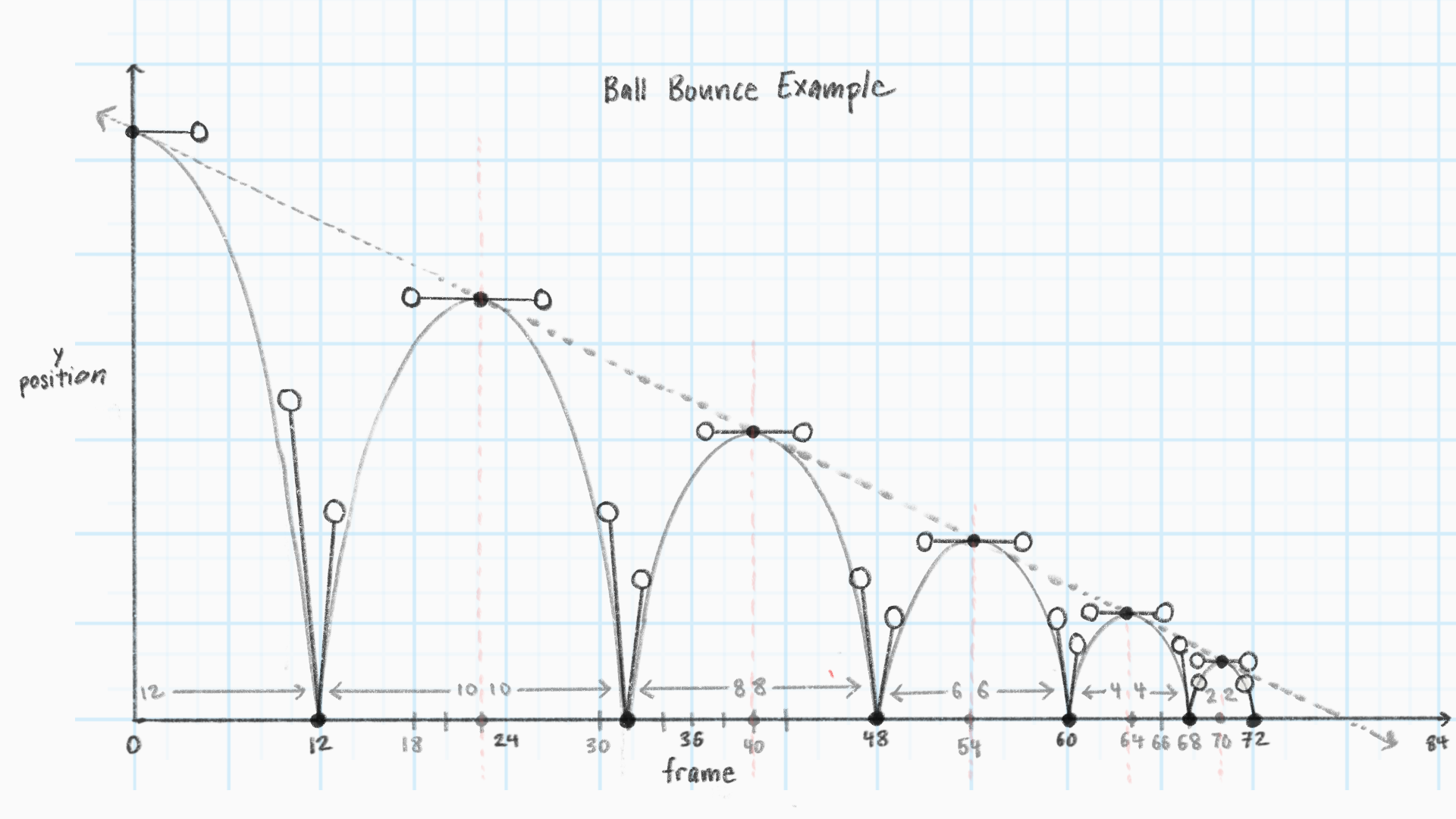
Background
AI-generated motion graphics are gaining a lot of popularity on platforms like Twitter, but they often lack the tasteful look that a human expert can achieve. There has been a surge of startups trying to create AI-assisted motion graphics editors, where an agent collaborates with the user to create motion graphics. These companies claim that unlike one-shot video generators, their agents create fully editable projects where the user can modify timing, keyframes, and curves in the graph editor.
Despite the rapid progress with every new model release, frontier models are not yet good collaborators for motion design.
Today, AI-assisted video editing is at a state where it can copy a reference video at a mediocre level, but to polish the result to professional quality, users have to guess, wait, and check to see if they can tease out the right parameters. While this workflow initially seems faster, the process of 'debugging' can easily eclipse the supposed saved time.
For the agent to be an effective collaborator, the user should trust
that it not only has a working understanding of animation fundamentals such
as arcs, exaggeration, secondary action, etc., but can also produce deterministic results when given the same prompt.
If basic animation fundamentals are understood and common
operations can be done reliably in one shot, users will have more
trust that the agent will perform in a way that saves time without
sacrificing control and creativity.
Why ball bounces?
A ball bounce is a beginner animation exercise that teaches students how to use arcs, timing and spacing, and squash and stretch to simplify how objects move in the real world. Unlike a physics simulation, curves are flexible and can be manipulated to make motion realistic or exaggerated. A skilled animator can make a form read like a heavy bowling ball, a floaty beach ball, or a bouncing snowman with extra airtime for dramatic effect.
Setup
Each rollout gives the model a task outlining the viewport size, ball's
start and end position, and animation duration. The model is asked to
create a CSS ball bounce animation with keyframes and easing. The model has access to tools read_file/write_file/list_dir/bash/finish and can check their work by calling render_graph, which shows
a graph plot of their work and a filmstrip.
Rubric
The rubric items are adapted from this tutorial created by Moshe Mahler. Each rubric item is graded pass/fail.
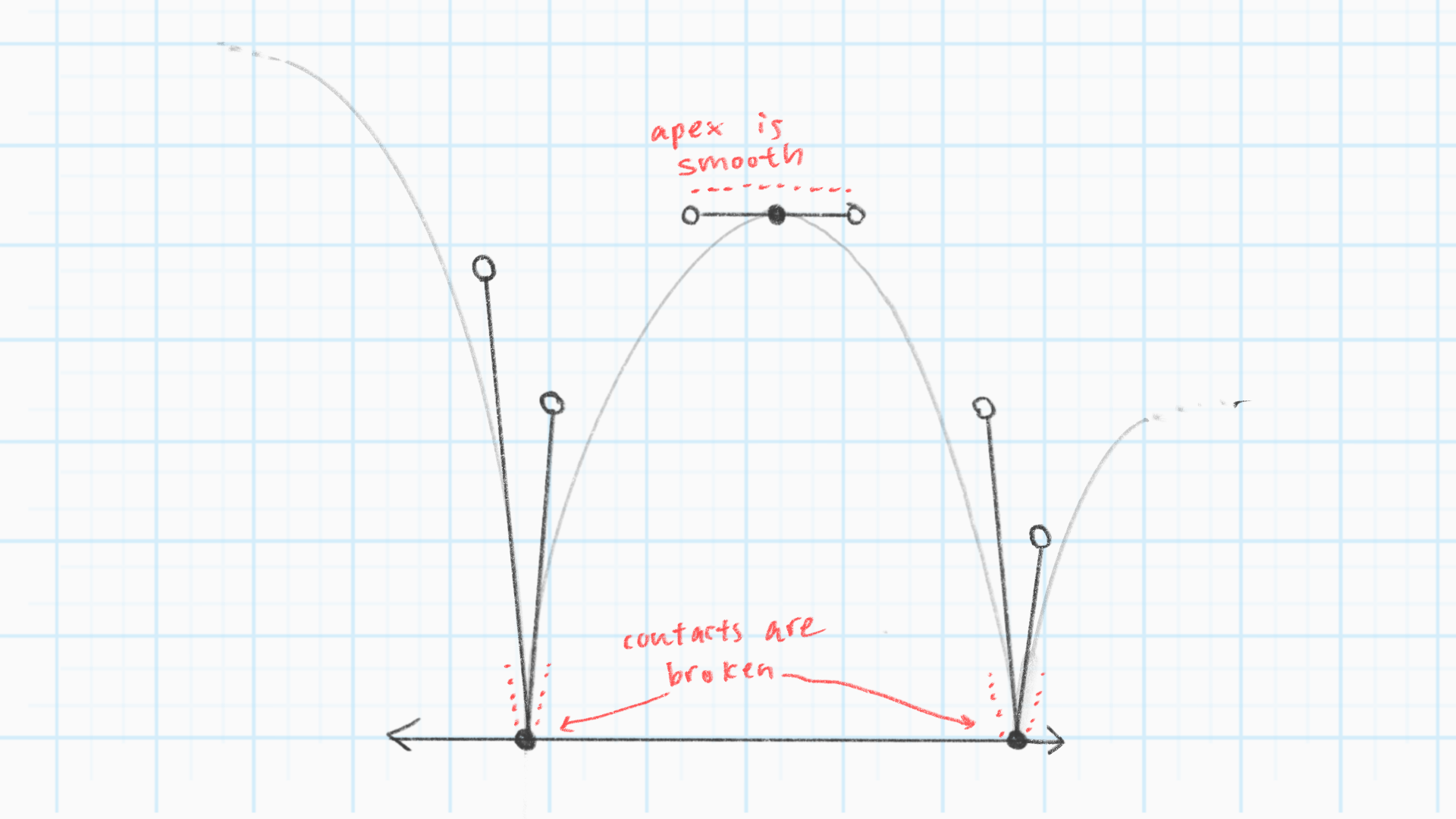
- Contact points have broken tangents and apexes are smooth
- Attempts at least 3 bounces
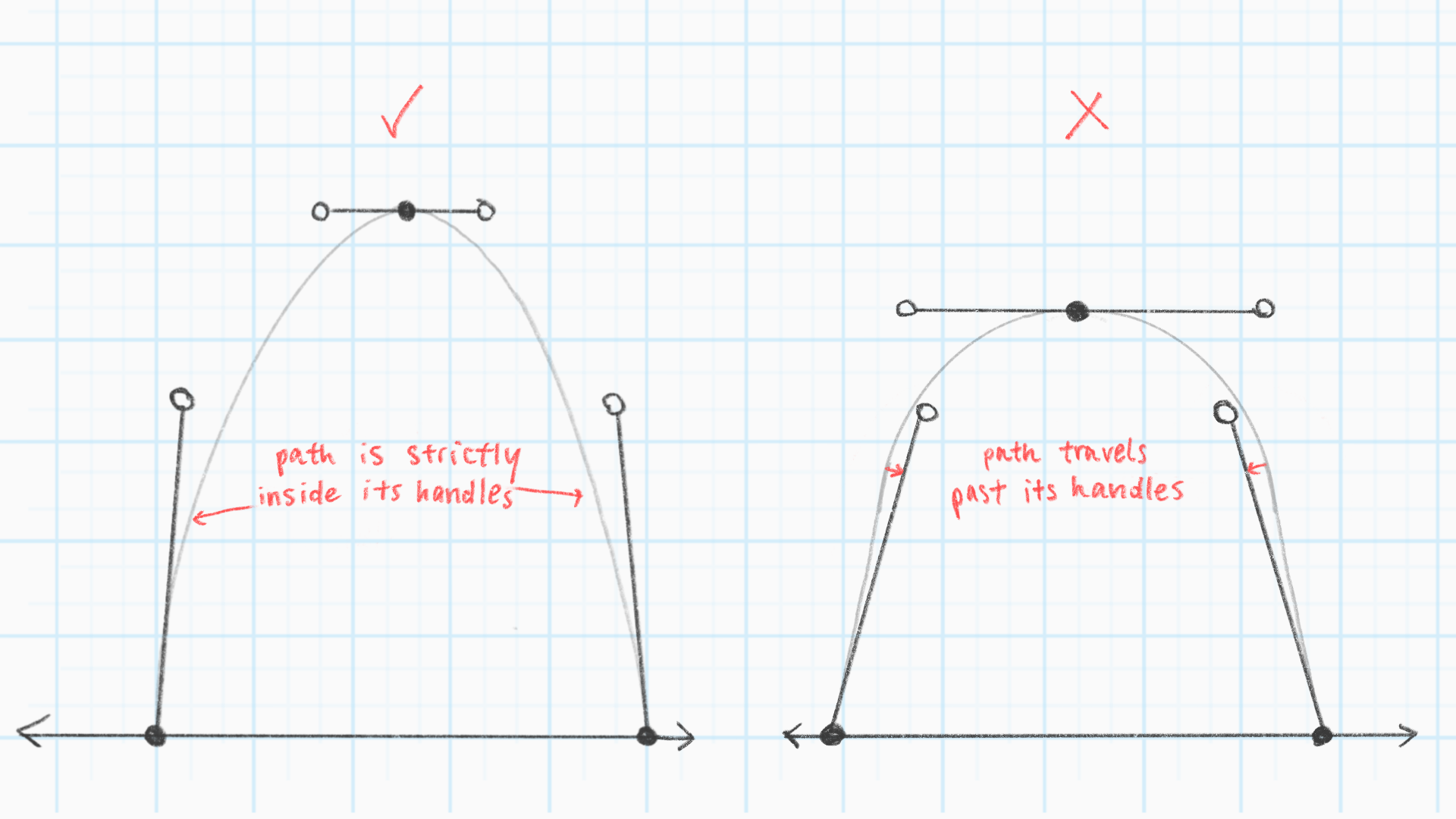
- At a given contact point, the ball's path does not bulge past its handlebars
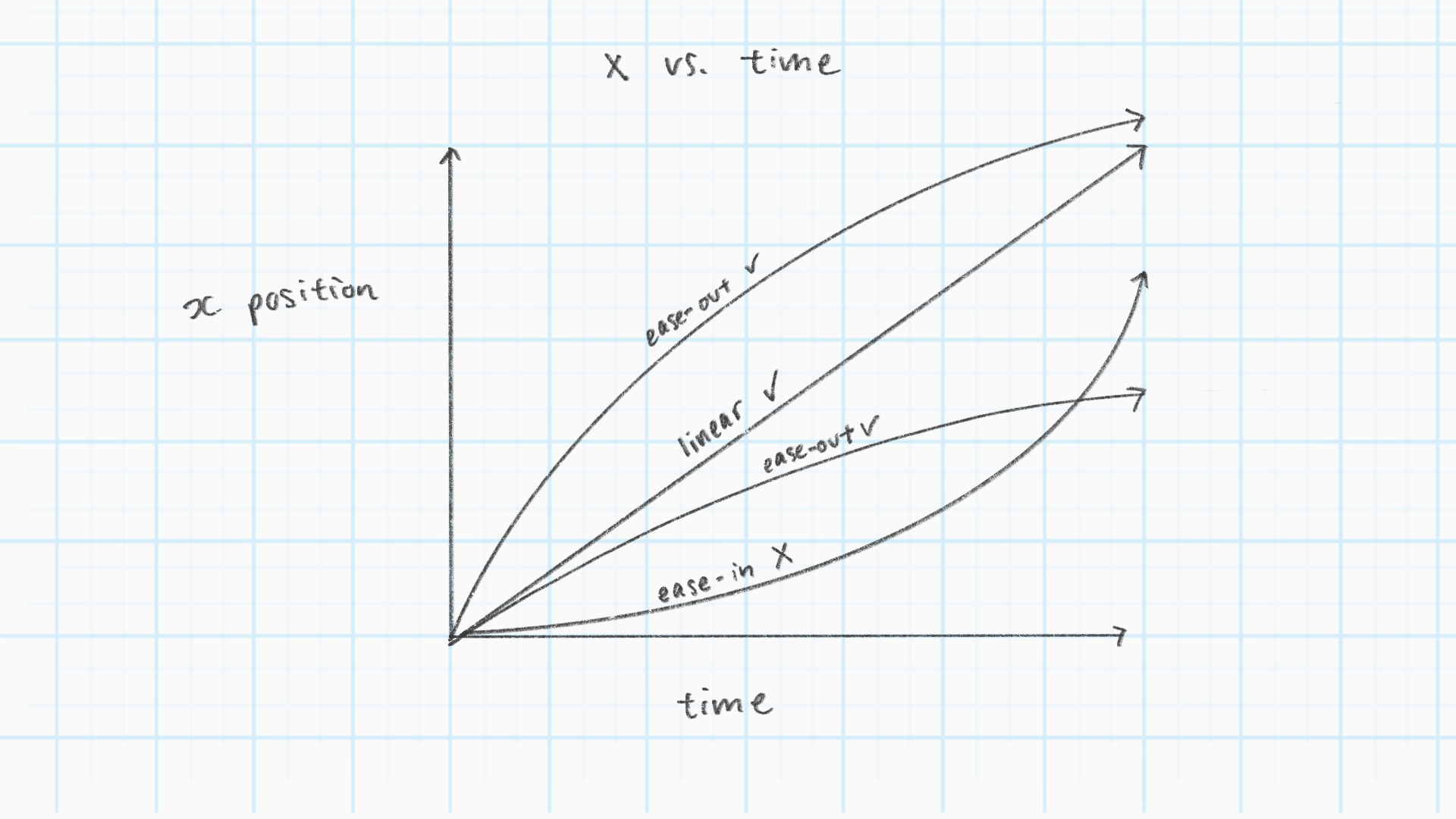
- Translate X is linear or subtle ease-out
- Every Y key is either a contact or apex, no in-between keys allowed
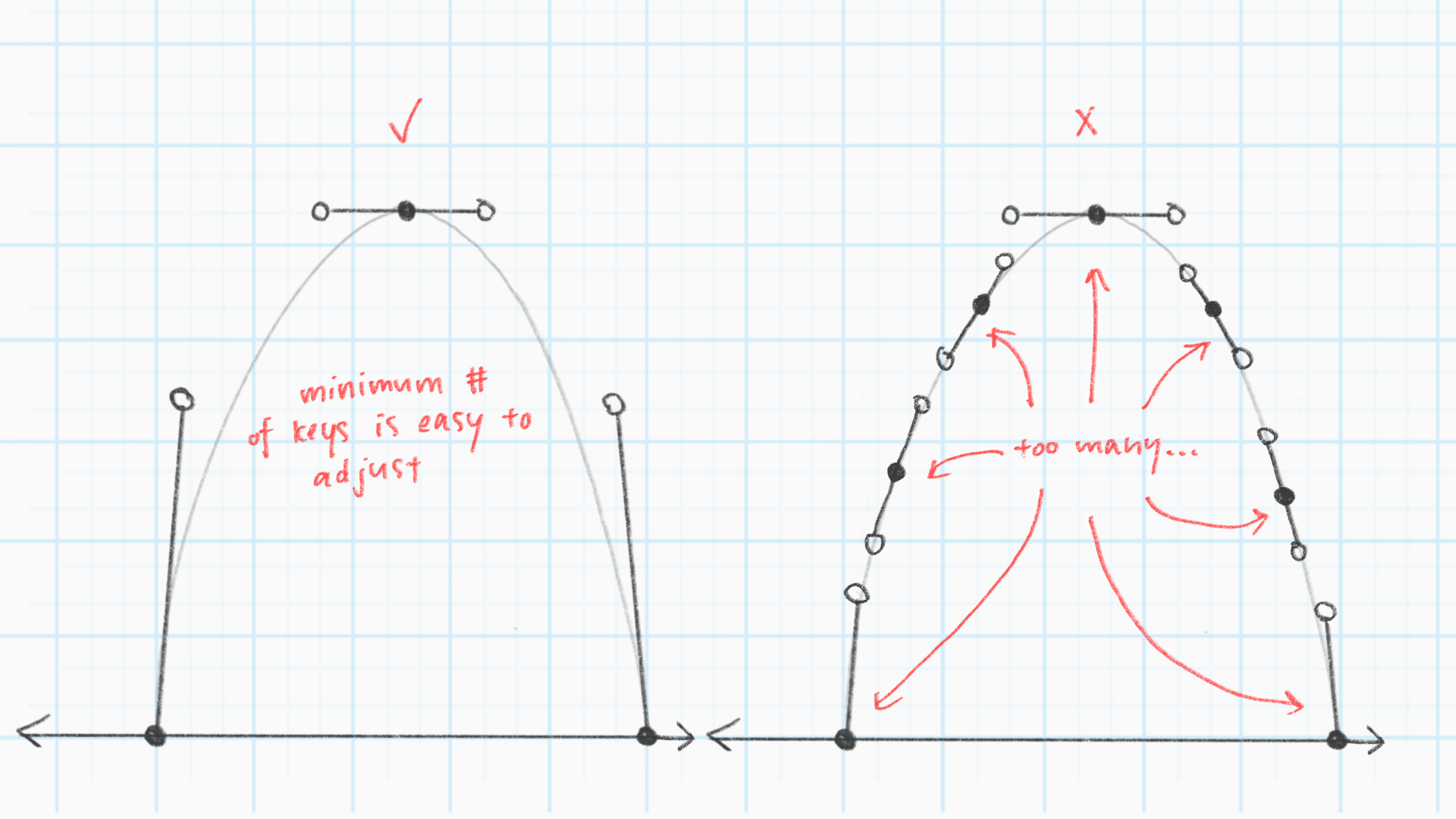
- At most two X keys, indicating a smooth path that is easily modifiable
- No stray keys on unused channels such as scale or rotation
- The final X key lands either on the last contact of the last bounce, or one last-bounce length past that point, indicating the ball rolling to a full stop
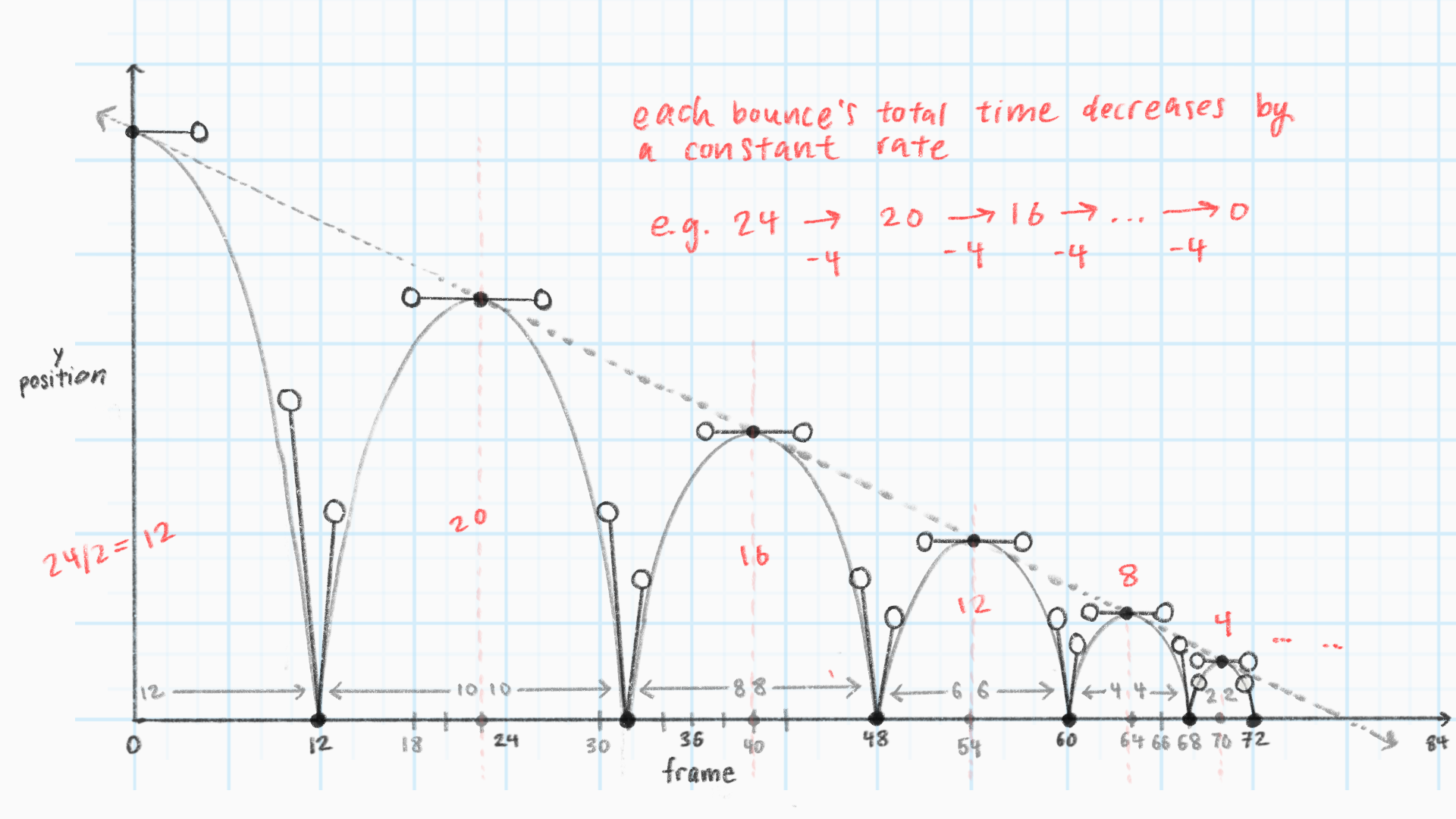
- The time of each bounce decreases at a constant rate
- Contact points have handles of length greater than zero
Results
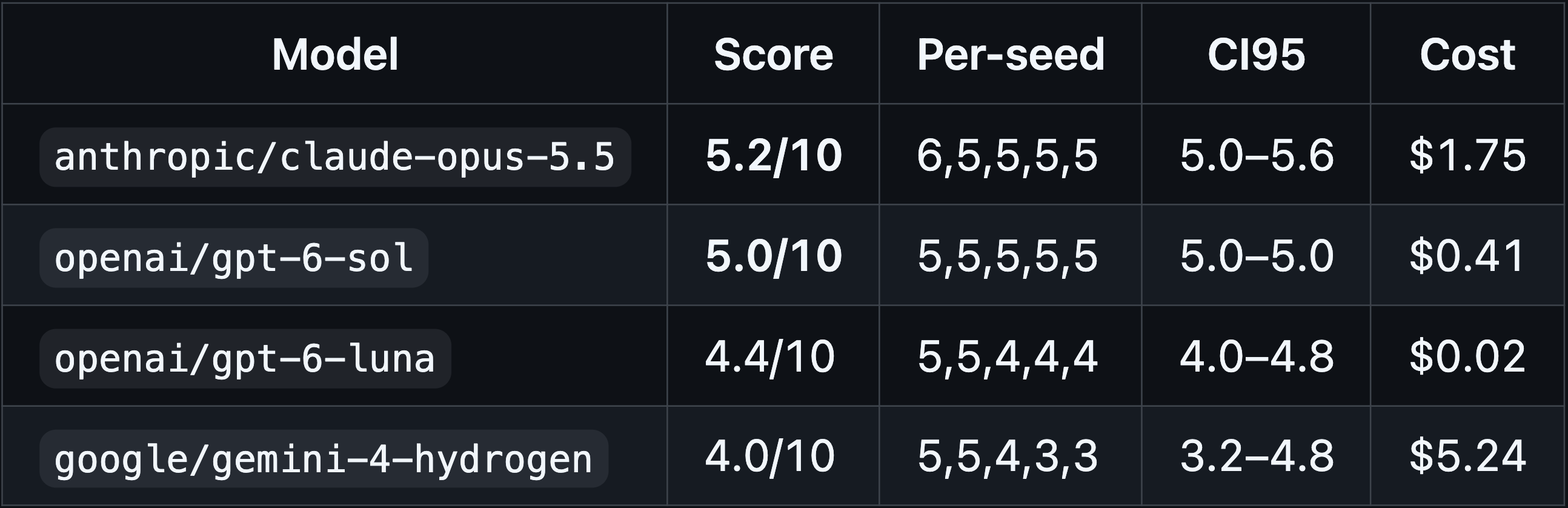
I ran 4 models x 5 seeds via OpenRouter. The results generally fell into two camps. Either the model created created a convincing looking bounce that had too many keyframes, or the model used the correct number of keyframes for the Y channel and the X-movement wasn't smooth.
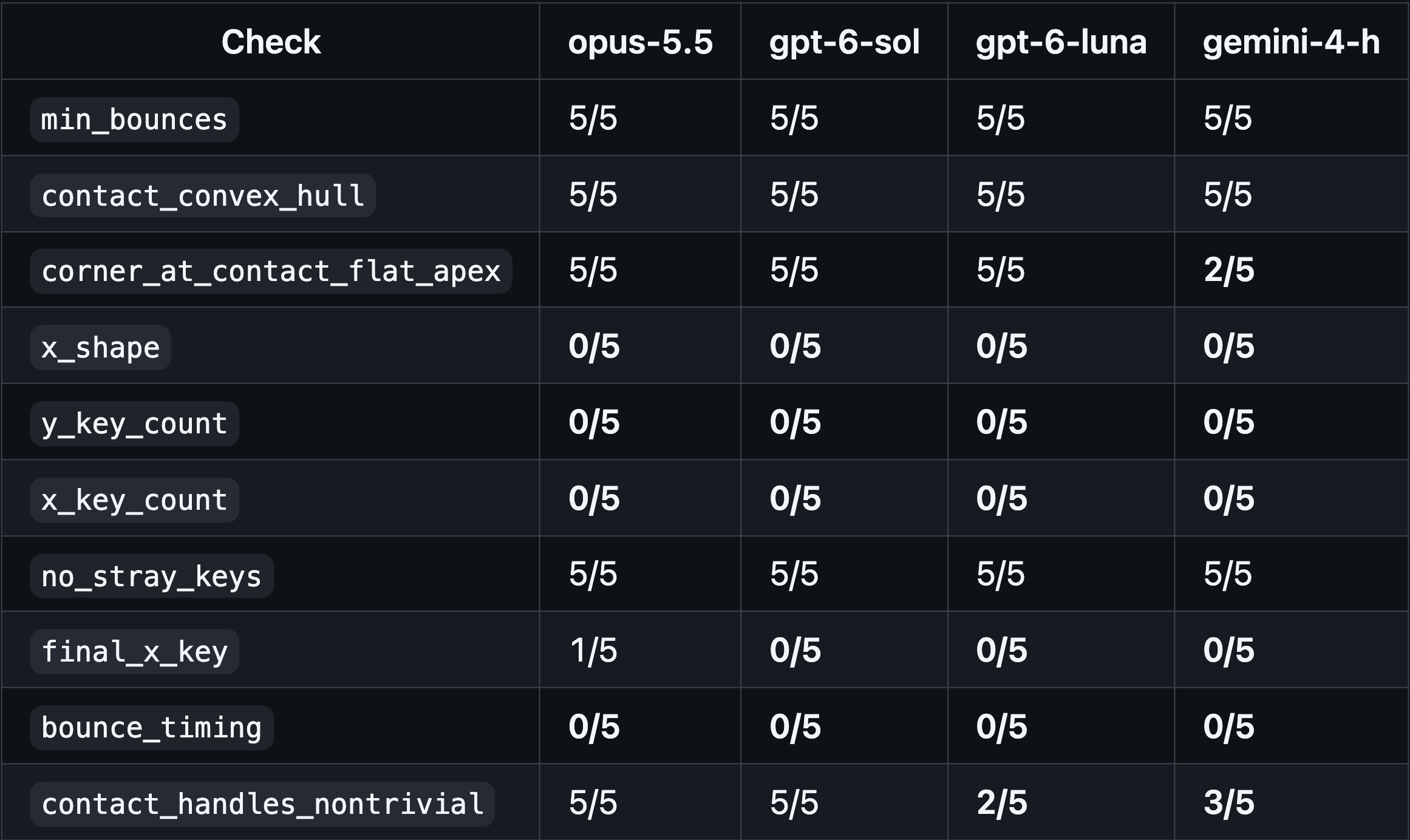
To my surprise, all of the models followed rule #3, which specifies that
the ball path must stay inside the contact point handlebars. Students
often struggle with this concept at first because it's possible to make
a convincing ball bounce without following this rule.
All of the models failed rule #9, which specifies that the time of each
bounce decreases at a constant rate. In real life, the time succeeding
ball bounces usually decreases by a multiplicative factor, but in animation,
this is approximated with subtracting a fixed number. This is because it
is more intuitive for a human animator to check their work with subtraction
as opposed to multiplication, and subtraction ensures that the numbers
always stay whole integers associated with frames.
All of the models' work had the same number of X keys and Y keys, breaking the rule that for all channels, the number of keys should stay relatively minimal. This makes human collaboration difficult because if a human wanted to modify the end-position of the ball's bounce but keep the overall travel shape, with respect to time, the same, instead of moving one keyframe, they would not only have to move about triple the number of bounces' worth of keyframes, but also fit them to their desired shape by hand.
This may be because CSS keyframes make separating channels inconvenient. Thus, it would be a good idea to run the same experiment across different frameworks.
Next Steps
The vanilla ball bounce exercise is effective because it is easy to spot when the animation looks wrong and there are few enough moving parts that the exercise stays focused on understanding the graph editor. Its simplicity lends itself well to be extended towards more complex tasks. Some ideas of future evals include:
- Testing other animation frameworks such as GSAP and Lottie
- Animating different ball typies, such as a ping pong ball, bowling ball, or beach ball
- Model is given a scene where they fix or restyle an existing ball bounce
- A ball obstacle course with a single ball, multiple identical balls, heavy/light balls, etc.
- Attempting any of what's listed above in a 3D scene in three.js
Zooming Out
Online discourse treats the problem of creating beautiful things as an
impossible task, but like many other fields that AI has been capable of
learning, successful motion is made up of small components that can be verified. Given
the ephemeral nature of design trends, it's really interesting to think
about what the lowest common denominators that have persisted throughout
design history are, and speculate whether or not they will hold in the future.
Automating motion design is just one example of how AI is changing what
it will mean to work as a designer. The creative world is headed
in a direction where it will be difficult for us to go back to a time
without artificial intelligence, but we can steer progress so that it
does not just benefit a small group of people.
← Previous
Next →